
You have built the app and there is no ad budget. The question is where the first users come from.
Here is the short version of how to promote an app for free. Fix your store page first, because Apple describes search as the source of the majority of App Store downloads. Then pick one or two channels where your users already spend time, and stay there for a month. Everything else is a bonus.
Most guides skip that answer and go straight to a list. This one has a list too, 17 channels long, but each channel is sorted by how much work it takes and what kind of return to expect. It also covers two things that are easy to get wrong: the App Store’s own free promotion tools, and the rules TikTok, Instagram, YouTube and Reddit apply to people promoting their own product.
A note on method. Store limits and platform rules below come from each platform’s own documentation, checked in October 2026, and are linked. Where something is my recommendation and not a documented fact, the text says so.
Free means you pay in time
None of these channels cost money. All of them cost hours, and they pay back in different ways. Some compound: work you do once keeps bringing in users. Others give a one-day spike, or are long shots.
The table sorts all 17 by effort to start and payoff pattern. The ratings are an editorial assessment of how each channel works. They are not measured results.
| # | Channel | Effort to start | Payoff pattern | Best for |
|---|---|---|---|---|
| 1 | Store search metadata | Low | Compounding | Every app |
| 2 | Product page tests | Low | Compounding | Apps that already get some store traffic |
| 3 | Ratings and reviews | Low | Compounding | Every live app |
| 4 | In-app events and Play promotional content | Medium | Spike, repeatable | Apps with real new content to announce |
| 5 | Featuring nomination | Low | Long shot | Polished apps with a launch or major update coming |
| 6 | Custom product pages | Medium | Compounding | Apps with several distinct use cases |
| 7 | Metadata localization | Low | Compounding | Apps that work without translating the app itself |
| 8 | TikTok | High | Unpredictable, can compound | Consumer apps that show well on camera |
| 9 | Instagram Reels | High | Unpredictable, can compound | Visual and lifestyle apps |
| 10 | YouTube Shorts and long-form | High | Compounding | Apps that need explaining |
| 11 | Medium | Compounding while you stay active | Apps with a matching, active subreddit | |
| 12 | Product Hunt | High | One-day spike | Tools for early adopters |
| 13 | Show HN | Low | Long shot | Technical products people can try at once |
| 14 | Niche communities | Medium | Compounding | Apps for a defined hobby or profession |
| 15 | Website and search content | High | Compounding, slow | Apps that solve a problem people search for |
| 16 | Beta and email list | Medium | Compounding | Apps that have not launched yet |
| 17 | Creator outreach | Medium | Spike | Apps a creator can demo in a minute |
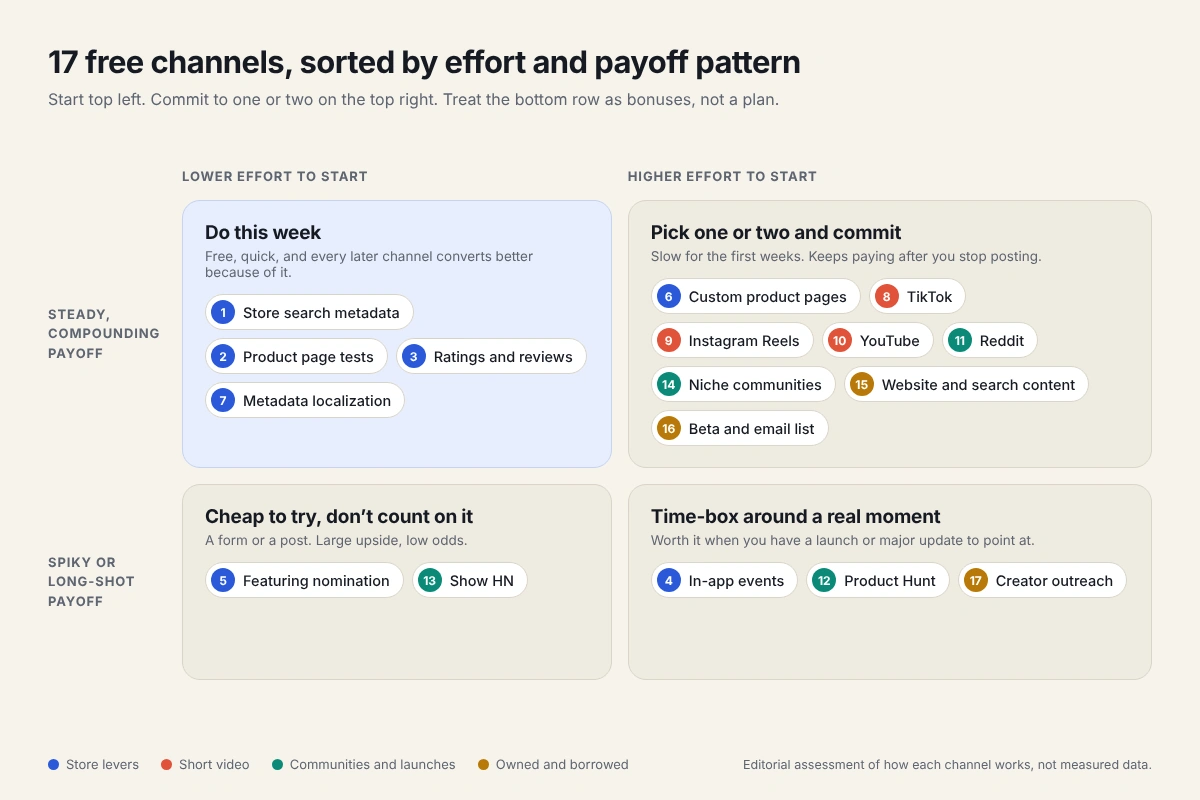
Start with the low-effort, compounding rows. They also make every other channel work better, because every visitor you earn elsewhere lands on the same store page.
How to market an app for free inside the store (channels 1 to 7)
People browsing a store are already looking for an app. Apple says search results depend on text relevance and user behaviour: matches for your title, subtitle, keywords and primary category, plus downloads, ratings and reviews. You control the first group directly and can influence the second.
1. Store search metadata
On the App Store, the keyword field holds 100 characters, with terms separated by commas and no spaces. Apple’s guidance is to leave out words already in your app name, subtitle or category, plurals of words you already have, and generic terms such as “app”. Promotional text does not affect search ranking, so keywords placed there do nothing. Apple also names the trade-off a new app faces. Popular terms bring traffic but are “highly competitive”, especially for a newer or smaller app, while less common terms bring less traffic with less competition. My reading for a new app: target specific, lower-volume phrases first and move up as ratings and downloads grow.
2. Product page tests
Product page optimization lets you test up to three alternate versions of your icon, screenshots and preview videos against the original. A test runs for up to 90 days, you can run one at a time, and Apple recommends waiting for at least 90% confidence before applying a result. Google Play has store listing experiments for the same job.
Test before you assume. One of Apple’s published examples is Simply Piano, which expected a preview video to lift conversion. The page without the video won.
The limitation is traffic. With a few visitors a day you may not reach a confident result inside 90 days. In that case, change one obvious thing at a time and watch conversion in App Analytics.
3. Ratings and reviews
Apple states that ratings and reviews can influence how your app ranks in search, and your rating shows next to the app in results. The system prompt can be shown up to three times in a 365-day period, so timing matters. Apple’s advice is to ask when someone has just completed an action, level or task, and not to interrupt them.
Reply to reviews as well. The reviewer is notified and can update the review. If an update fixes something an old review complained about, say so in a reply.
You can reset your rating when you release a new version. Apple recommends doing so sparingly, because a page with few ratings can put people off.
4. In-app events and Play promotional content
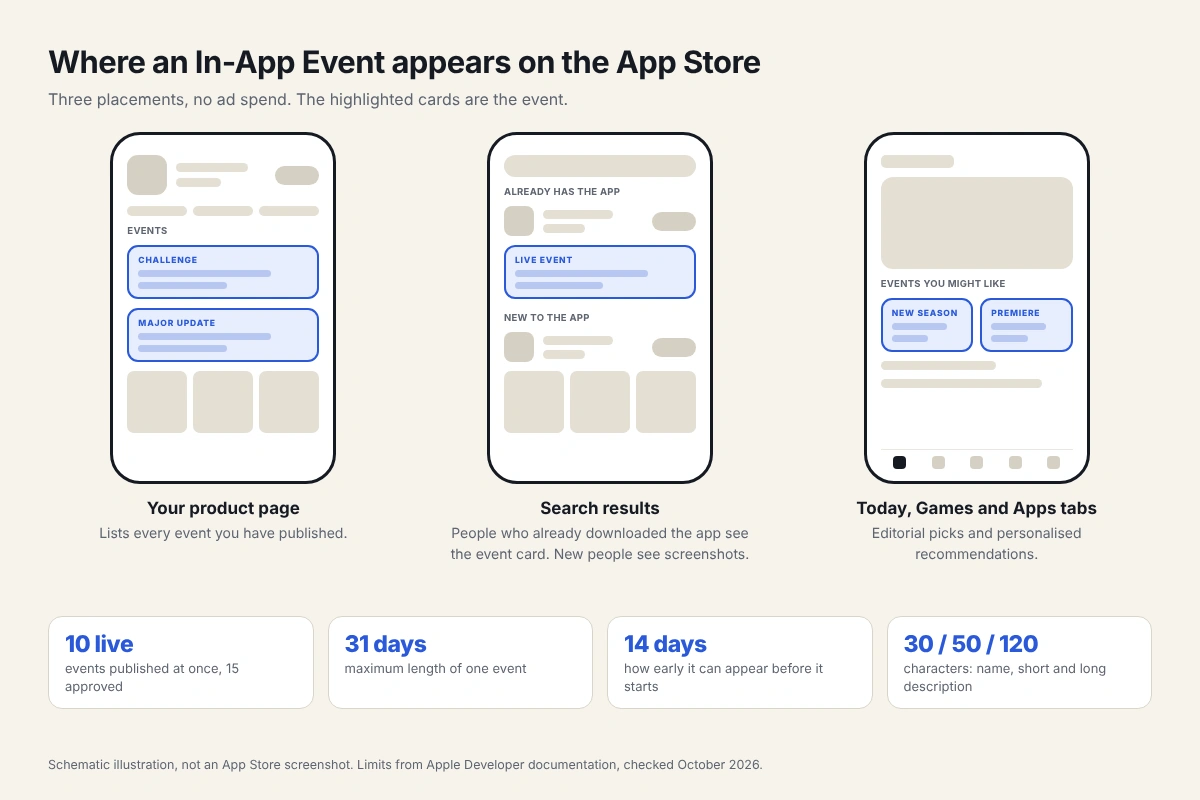
In-app events are App Store cards for timely moments in your app: a challenge, a competition, a major update, a premiere. They appear on your product page, in search results, and in editorial and personalised sections of the Today, Games and Apps tabs. One detail matters for growth. In search, people who already downloaded your app see the event card, while people who have not see your screenshots. So events are strongest at bringing back existing and lapsed users, and they reach new users mainly through the tabs and your product page.
The limits: up to 10 events published at once (15 approved), each up to 31 days long, visible up to 14 days before the start. The event name gets 30 characters, the short description 50 and the long description 120.
Apple lists what does not qualify: a price promotion with no new content, a repeating daily reward, or a general message to raise awareness of the app. You need something real and time-limited.
On Google Play the equivalent is promotional content. It is open to all games, and to apps that meet Google’s eligibility criteria for premium growth tools. Check your Play Console before planning around it.
5. Featuring nominations
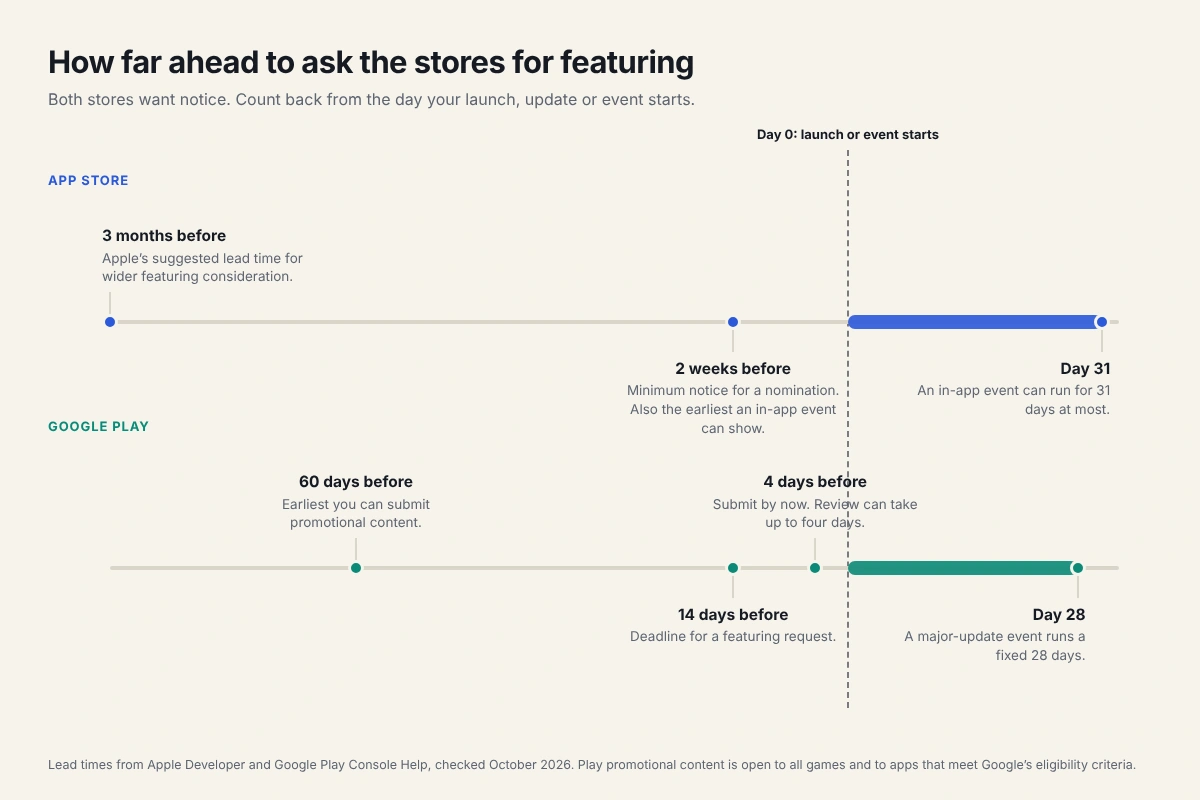
Any developer can ask Apple’s editors for featuring through Featuring Nominations in App Store Connect. Apple asks for at least two weeks’ notice and recommends up to three months for wider consideration. A nomination sent in launch week is late.
Apple says there is no checklist, but it names what editors consider: user experience, UI design, innovation, uniqueness, accessibility, localization and the quality of the product page. Older apps are eligible too. Apple says App of the Day can go to an app that has “been around for a decade”.
Treat it as a long shot that costs one form. On Google Play, a featuring request is made inside a promotional content event and must go in at least 14 days before the start date.
6. Custom product pages
You can publish up to 70 custom product pages, each with its own screenshots, promotional text and preview videos, and each with its own URL. They are submitted for review without a new app version. Two uses cost nothing:
- Assign keywords to a page so that it appears in search results for those terms in place of your default page. Someone searching for one feature sees screenshots of that feature.
- Link each piece of content you publish to the page that matches it.
Apple reports that developers see an average 2.5 percentage point lift in conversion when referring people to a custom page, against a 1.6% average on default pages. Apple does not publish the sample or the period, so read it as direction, not a forecast. Google Play offers up to 50 custom store listings.
7. Metadata localization
Apple suggests localizing your product page so people in other regions can understand the app, and lists localization among its featuring considerations. Translating the name, subtitle, keywords and screenshot captions for one extra market is a few hours of work.
A caution from me, not from Apple: if the app itself is not usable in that language, a translated store page can earn downloads followed by poor reviews. Start with markets where the app works as it is.
How to promote an app on social media (channels 8 to 10)
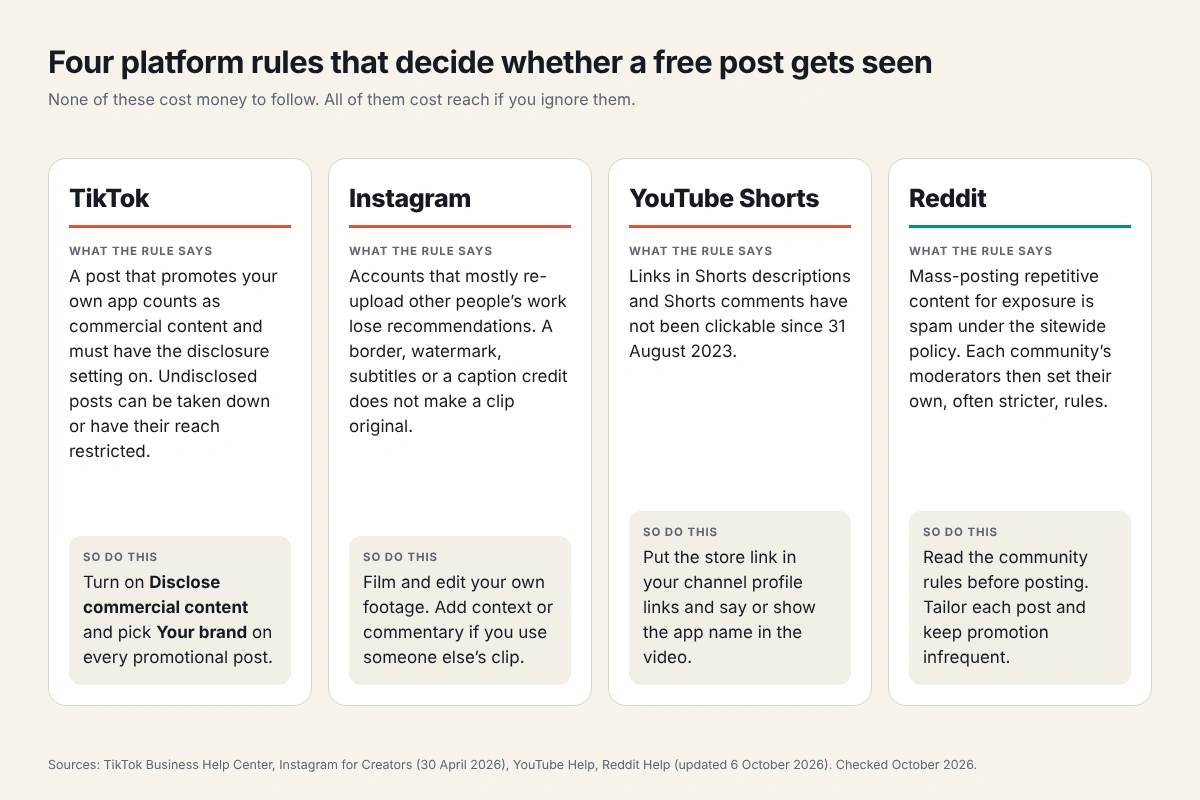
Short vertical video is the format all three large platforms push, and one clip can be adapted for each. What differs is the rulebook. Each platform has a rule that decides whether a promotional post gets shown, and none of them is obvious.
A recommendation that applies to all three: show the problem and the app solving it in the first seconds, cover one use case per clip, and put the app name on screen. Reach is unpredictable. I have not included a benchmark for installs from organic short video because I could not verify one. Give one platform a month of regular posting before judging it.
8. How to promote an app on TikTok
Promoting your own app counts as commercial content. TikTok’s help centre says that when a post promotes a brand, product or service, you must turn on the commercial content disclosure setting. Choose “Your brand” for your own app. “Branded content” is for promoting a third party and adds a “Paid partnership” label. According to the same page, posts without the proper disclosure can be taken down or have their reach restricted.
Sources differ on the exact label a “Your brand” post receives. TikTok’s page describes a commercial content label, while some third-party guides call it “Promotional content”. The setting to use is the same either way.
Music is the second trap. Reporting since 2020 says business accounts are limited to TikTok’s royalty-free Commercial Music Library for promotional posts. Unverified — requires confirmation: I could not open TikTok’s own page on this, so the link is to Social Media Today’s report quoting TikTok. Check the current terms in the app before using a trending sound on an app account.
9. How to promote an app on Instagram
Instagram tightened its originality rules on 30 April 2026. Accounts that primarily post unoriginal content, now in photos and carousels as well as Reels, are no longer shown in recommendations. Adding a border, watermark, subtitles or a caption credit to someone else’s work does not make it original. An account becomes eligible again once most of its recent posts over a 30-day period count as original.
For an app account this rules out a common shortcut: filling the feed with reposted memes or other people’s clips about your category. Footage you film of your own app is original under Instagram’s definition.
Instagram says 75% of recommendations in the US now come from original posts. That is Instagram’s own figure with no method published, and it measures recommendations, not installs.
10. YouTube Shorts and long-form video
One rule shapes the approach. YouTube announced that from 31 August 2023, links in Shorts descriptions and Shorts comments would no longer be clickable. A Short cannot send someone to the store with a tap.
Put your store link in the channel profile links, which YouTube introduced in the same announcement, and say or show the app name in the video. Use Shorts for discovery and a longer walkthrough, where description links still work, for people who want detail. Longer tutorials can also be found through YouTube search long after you publish them; that last point is my assessment.
Communities and launches (channels 11 to 14)
11. Reddit
Reddit’s spam policy prohibits “mass-posting repetitive content for the purpose of exposure or financial gain”. Its advice to business owners: if your contributions are primarily links to something you run or benefit from, be thoughtful about how often you post, or buy ads. It also says each community’s moderators decide what counts as unwanted content there.
So the working method is to find the two or three subreddits where your users are, read each one’s rules, and contribute before you mention the app. When you do post, write it for that community. One post pasted into several subreddits is the pattern the policy describes.
You will see a “9:1” or “10%” self-promotion ratio quoted widely. It is usually attributed to an older Reddit wiki page that now says it is no longer updated, and the current Help page gives no ratio. Treat it as a community convention.
12. Product Hunt
A Product Hunt launch gives you one day on a public leaderboard in front of early adopters. In my assessment it suits tools for a tech-comfortable audience more than, say, a casual game.
Unverified — requires confirmation: Product Hunt’s own launch guide could not be opened during research. Secondary guides (HackerNoon, Stackmatix) agree on two points: the launch day starts at 12:01 a.m. Pacific time, and you should ask your network for feedback and comments, not for upvotes. Confirm both on producthunt.com before you launch.
Be realistic about the return. One team that launched in 2023 and again in 2025 wrote that traffic “felt diminished” the second time, despite finishing second for the day. That is one account, not data. It does point to a sensible use of the channel: a deadline that makes you tell everyone you know, with leaderboard traffic as a bonus.
13. Show HN
Hacker News has a section for things people can try, and its rules are short and strict. The project must be something people “can run on their computers or hold in their hands”. Landing pages and sign-up pages do not qualify, and work that is not ready to try should wait. Make it easy to try without a signup, be around to answer questions, and do not ask friends to upvote or comment.
A live mobile app qualifies. A waitlist page does not. The audience is technical, so in my assessment this fits developer tools and unusual technical work better than mainstream consumer apps.
14. Niche communities
Most apps serve a hobby, a job or a problem, and each of those has a Discord server, a Facebook group, a forum or a newsletter. This section is a recommendation with no data behind it. Answer questions for a couple of weeks, ask the organisers how they handle member projects, and share the app when it answers something someone asked.
Owned and borrowed audiences (channels 15 to 17)
15. Website and search content
People search the web for problems before they search a store for apps. An article that answers one of those problems and links to your app keeps working after you publish it. It is slow; in my assessment, plan for months.
One way to make it measurable: link each article to the custom product page that matches its topic. Each custom page has its own URL, and App Analytics reports impressions, downloads and conversion per page, so you can see which articles bring installs.
16. Beta and email list
Before launch, a public beta is a practical source of early users and feedback. TestFlight lets you invite up to 10,000 external testers by email or through a public link you can post anywhere, and you can limit who qualifies by device type or OS version. External testing needs a beta description, and the first build goes through review.
Collect an email address from every tester and waitlist signup. On launch day, that list is the one audience you can reach without an algorithm in the way.
17. Creator outreach
Small creators and newsletter writers in your niche often cover tools they find useful. Offer free access and let them decide. No money changes hands, but disclosure still applies. On TikTok, promoting a third party’s product is branded content, and guides to the policy say that includes posts made for an incentive other than payment. Ask creators to turn the setting on.
Which free channels to start with
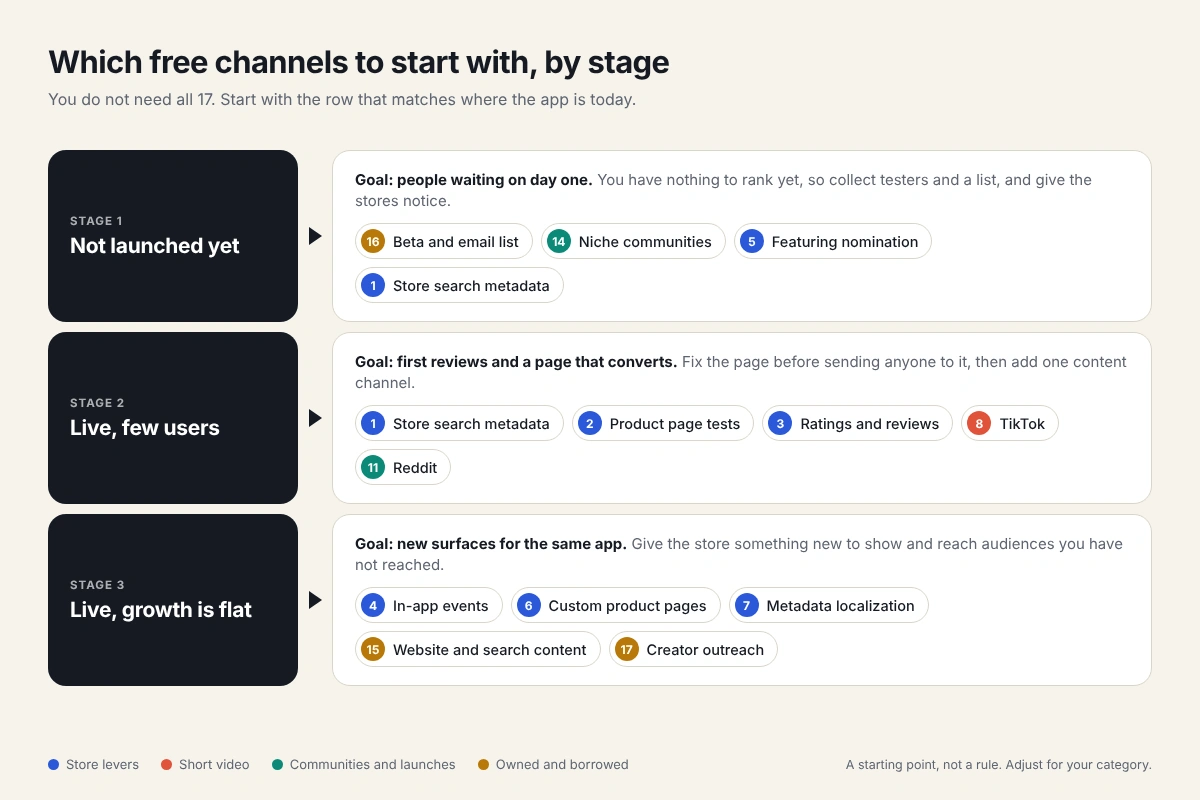
You do not need all 17. Match the list to where the app is today.
Not launched yet: Open a beta and collect emails (16), join the communities your users are in (14), send a featuring nomination for launch day (5), and draft your metadata (1). Live, few users. Fix metadata (1), start a product page test (2), add the review prompt (3), then add one video platform (8, 9 or 10) and one community (11 or 14).
Live, growth is flat: Give the store something new to show with in-app events (4), custom product pages (6) and localization (7), then reach new audiences with search content (15) and creators (17).
A 30-day plan with no ad budget
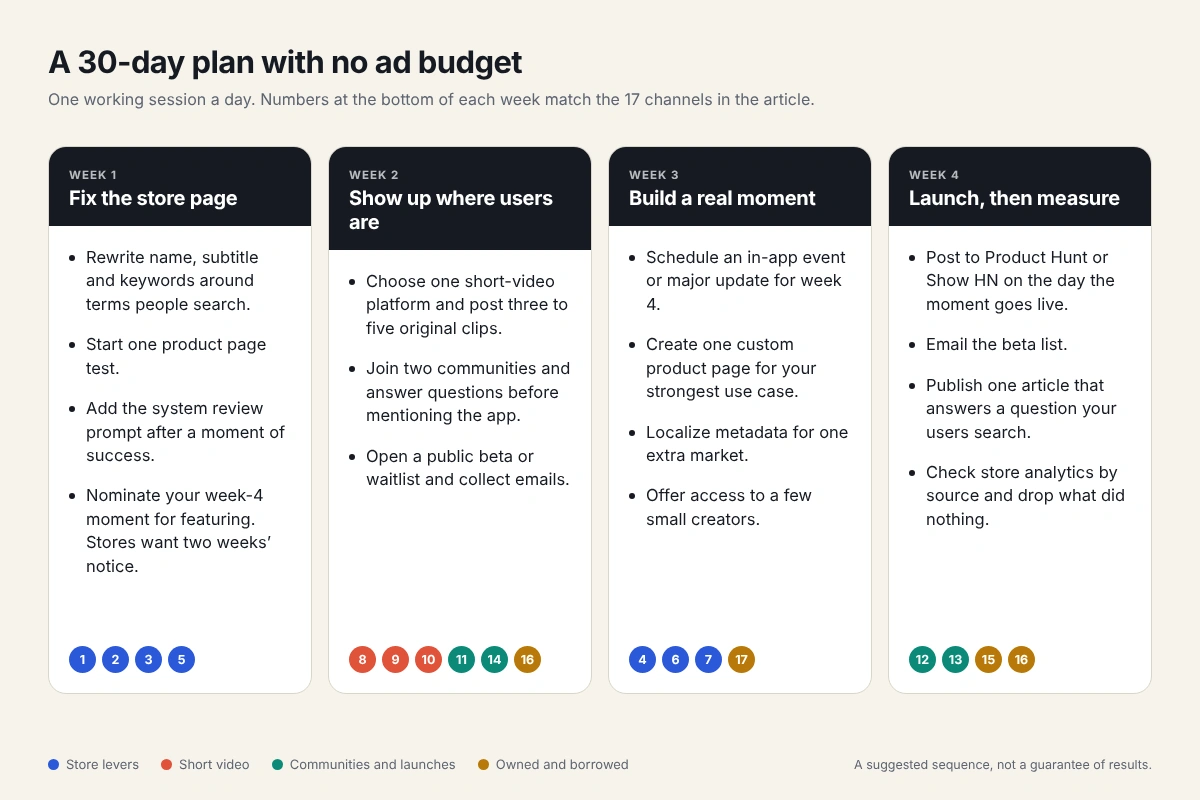
This is a suggested sequence, not a promise of results. It is built around one constraint from the sections above: stores want about two weeks’ notice, so the nomination goes in during week 1 for a moment in week 4.
1. Week 1: fix the store page
Rewrite the name, subtitle and keywords. Start one product page test. Add the system review prompt after a moment of success. Nominate your week-4 moment for featuring.
2. Week 2: show up where users are.
Choose one short-video platform and post three to five original clips. Join two communities and answer questions before mentioning the app. Open a public beta or waitlist.
3. Week 3: build a real moment.
Schedule an in-app event or major update for week 4. Create one custom product page for your strongest use case. Localize metadata for one more market. Offer access to a few small creators.
4. Week 4: launch, then measure.
Post to Product Hunt or Show HN on the day the moment goes live. Email the beta list. Publish one article that answers a question your users search. Check store analytics by source and drop what did nothing.
Five mistakes that waste free effort
1. Sending traffic to a page you have not fixed.
Every channel ends at the store page. Do channels 1 to 3 first.
2. Nominating in launch week.
Apple asks for two weeks at minimum and suggests up to three months.
3. Using an in-app event for a discount.
Apple lists price promotions without new content as poor candidates.
4. Pasting one post into many subreddits.
That is the behavior Reddit’s spam policy describes.
5. Putting the store link in a Shorts description.
It is not clickable. Use the channel profile links.
Where free promotion runs out
Free channels have real limits. They take hours you may not have. Video and launch platforms are unpredictable, and nobody can promise reach. Popular search terms are, in Apple’s words, highly competitive for newer and smaller apps. Featuring is an editor’s decision, and Play promotional content is not open to every app.
None of that argues for skipping them. A store page that converts and one channel that reliably brings users are also what paid acquisition needs in order to work. That is my view, not a sourced claim: free channels are how you find out what to pay for later.
What to do next
Open App Store Connect today and do three things: rewrite your keyword field, schedule the review prompt for a moment of success, and send a featuring nomination for your next release date. Then pick one channel from the “commit” group and give it 30 days before you decide whether it works.

Pingback: How to Get More App Store Reviews in 2026
Pingback: How Much Money Do Apps Make? 2026 Earnings Per Download
Pingback: How to Make an App with ChatGPT? Make an App With ChatGPT and Get It on the App Store (2026)
Pingback: iOS App Launch Checklist 2026: 40 Steps Before and After