
RevenueCat is free up to $2,500 a month in tracked revenue, then charges 1%. For many bootstrapped apps that is fair. But several rivals give you more free room or a lower rate, and a few cost nothing for the core features at any size.
This guide lists ten options and works out what each would cost at $20K and $50K a month. I read each vendor’s pricing page and did not test any tool. Nothing here says you should leave RevenueCat. It shows what else exists and what to check first.
What RevenueCat charges, and where the alternatives differ
RevenueCat’s page says you pay nothing for up to $2,500 in monthly tracked revenue, then 1% of the revenue you track. All features come with Pro, with no tiers. The page does not say whether the 1% applies to the whole amount or only the part above $2,500. A rival’s blog says the whole month, so I use that in the arithmetic below.
Here is what each in-app tool would charge, if all of your revenue passed through the paid layer:
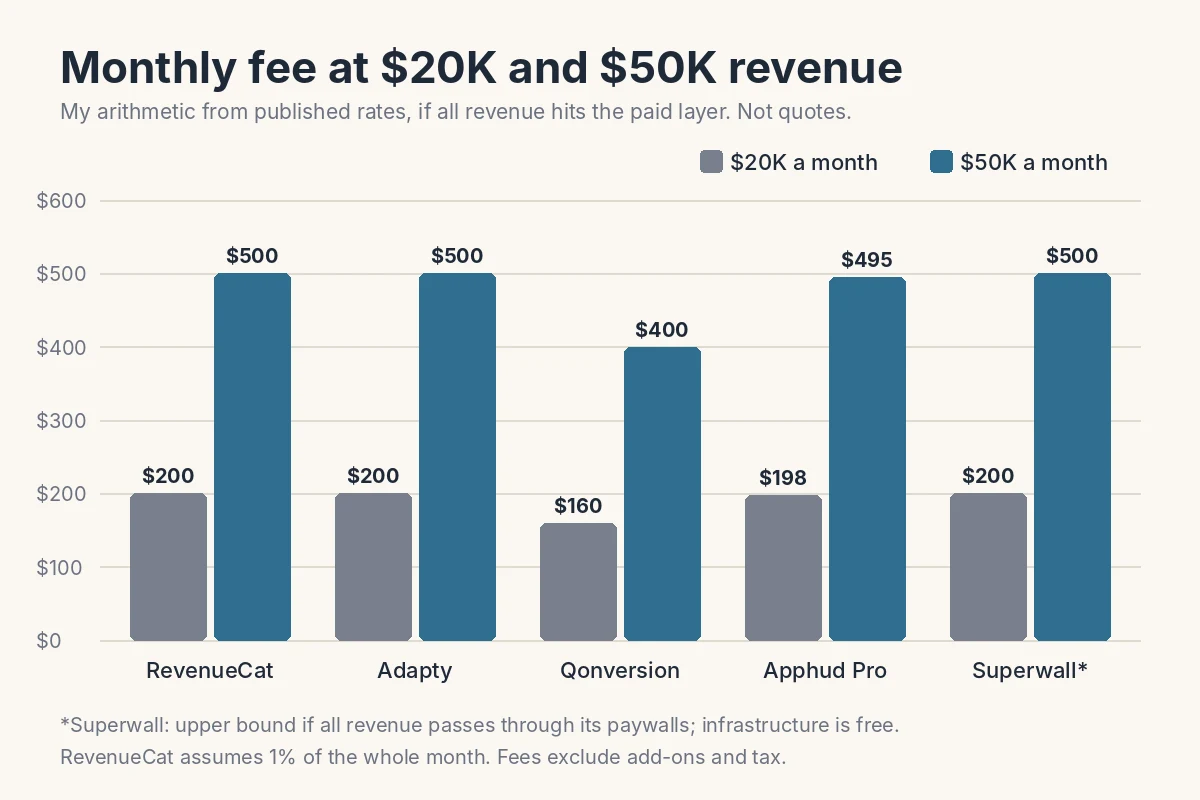
The gaps are small in dollars. At $50K a month, Qonversion saves about $100 a month against a 1% tool. At $20K it saves about $40. My advice: do not switch only for the percentage. Switch for a feature you need, a higher free limit, or lower lock-in.
In-app subscription tools
1. Adapty
- Free and paid: free under $5K a month, then 1% of monthly tracked revenue, with no tiers or fixed fees. The FAQ says that after you cross $5K you pay 1% of the full amount.
- What it lists: purchase infrastructure, a flow and paywall builder, A/B tests and revenue analytics.
- Watch out: add-ons cost extra. Refund Saver is 0.2% of monthly revenue and Ads Manager is 3.5% of ad spend. Both are free under $5K.
- Best for: the closest feature match to RevenueCat with double the free limit.
2. Qonversion
- Free and paid: free at or under $7,000 a month, then 0.8% of all tracked revenue, not just the excess. The page’s examples: $8,000 costs $64 a month and $50,000 costs $400.
- What it lists: analytics with LTV and cohorts, A/B experiments, a no-code paywall builder, Refund Keeper, integrations, unlimited apps and seats.
- Best for: founders who want the lowest published percentage among the in-app tools here.
3. Apphud
- Free and paid: free up to $10K a month. The free plan has purchase infrastructure, analytics, a no-code paywall builder and 1 seat. Pro is 0.99% (at least $49 a month) and adds A/B tests and 5 seats. Expert is 1.19% (at least $59).
- Watch out: if you pass $10K on the free plan you get 14 days before you lose dashboard access.
- Best for: the highest free limit among the dedicated tools.
4. Superwall
- Free and paid: subscription infrastructure (entitlements, purchase APIs, receipt validation, webhooks, revenue analytics) is free at any scale. Paywalls are free up to $10k a month in paywall revenue, then 1%.
- Watch out: the page’s own examples charge 1% of all paywall revenue once you pass the limit ($25k costs $250). Ask Superwall to confirm.
- Good to know: it can use RevenueCat as the source of truth for entitlements, so it does not always replace it.
- Best for: founders who want to keep purchase handling free and pay only for paywalls.
5. Iaptic
- Free and paid: free forever with 100 transactions and 20,000 requests a month. Paid plans are $29 (500 transactions), $59 (1,000) and $299 (10,000) a month, as “from” prices on yearly plans.
- Watch out: it counts transactions, not revenue. A cheap app with many small sales may pass the limit fast. The page says little about paywalls or testing, so it is not a one-to-one RevenueCat swap.
- Best for: apps that mainly want receipt validation at a flat, predictable price.
6. Apple’s own APIs (build it yourself)
- What it gives you: Apple’s App Store Server API lets your server read subscription status and transaction history, look up refunds, extend renewal dates and test notifications.
- Price: the page I read states none.
- Watch out: you must run a server, sign requests with JWTs, and build your own analytics, paywalls and tests. Apple offers an open-source App Store Server Library to help.
- Best for: developers who want zero vendor fees and have time to build.
7. Purchasely
- Price: none on the page I read. The only call to action is “Book a meeting.”
- What it lists: paywall and screen building, A/B testing, flows, campaigns, analytics and integrations.
- Best for: founders who are fine talking to sales. For a bootstrapped team the missing price is a risk, so ask for a written quote.
Web checkout tools (merchant of record)
These three sell subscriptions you charge outside the App Store. As merchant of record they sell to your customer and handle taxes. None of their pages mentions in-app purchases or App Store rules. I did not verify Apple’s rules for selling outside the App Store, so check them first.
On a $10 charge, my arithmetic from the published rates gives:
| Tool | Published rate | Fee on a $10 charge |
|---|---|---|
| Paddle | 5% + 50 cents | $1.00 |
| Lemon Squeezy | 5% + 50 cents | $1.00 |
| Polar Starter | 5% + 50 cents | $1.00 |
| Polar Pro ($20 a month) | 3.8% + 40 cents | $0.78, plus the $20 monthly fee |
International cards on Polar add 1.5%, and each dispute costs $15.
8. Paddle
- What it lists: merchant of record, tax collection and filing, fraud protection, chargebacks and billing support. Products under $10 need a custom quote.
- Watch out: the page gives no app-specific fee.
9. Lemon Squeezy
- What it lists: merchant of record with automated sales tax and VAT, fraud protection, billing support and failed payment recovery. No monthly fee for ecommerce.
- Watch out: the page says some payments carry small extra fees, such as non-US transactions, without itemising them. It says nothing about mobile app subscriptions.
10. Polar
- What it lists: a free Starter plan and paid plans at $20, $100 and $400 a month that swap the per-transaction merchant of record fee for a lower rate.
- Watch out: early members (organizations created before 27 May 2026) have a different rate, 4% + 40 cents plus 0.5% on subscriptions. The page does not say what the merchant of record role covers.
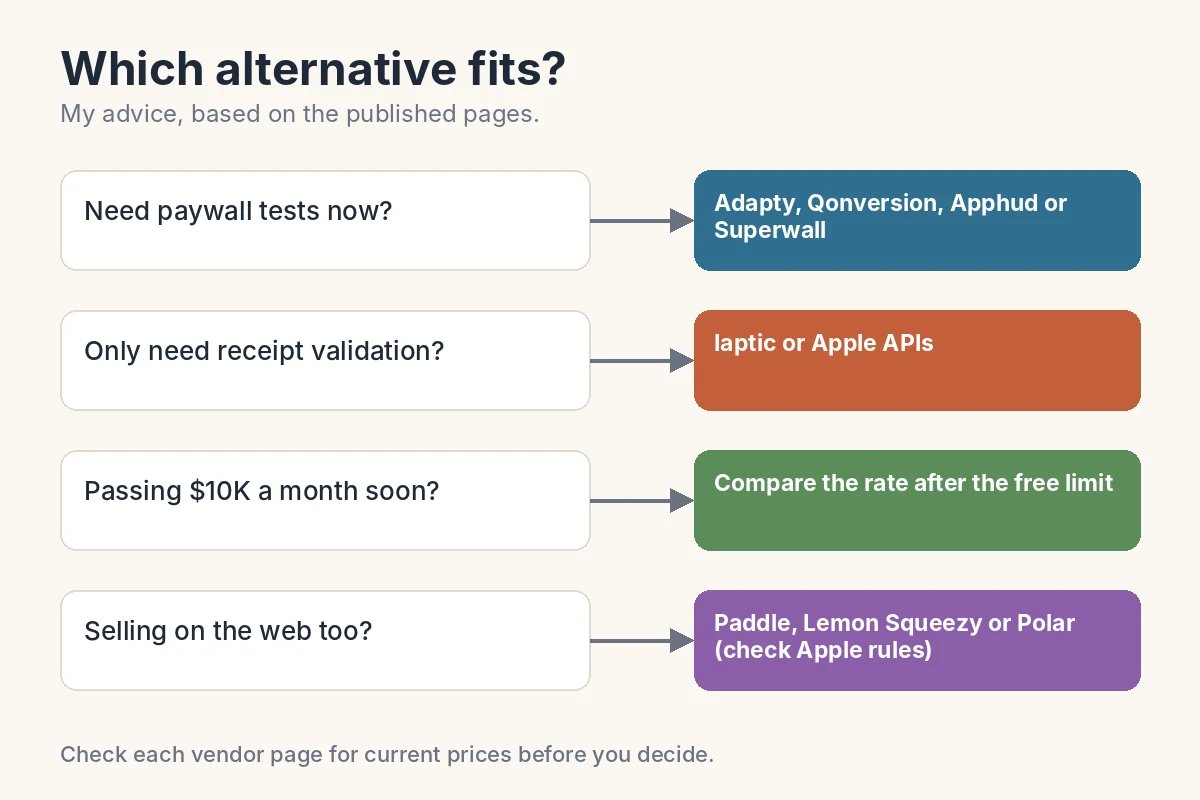
How to choose in three questions
This is my advice, based on the published pages.
- Do you need paywall tests now? If yes, pick Adapty, Qonversion, Apphud or Superwall. If no, Iaptic or Apple’s APIs may be enough.
- Will you pass $10K a month soon? If yes, compare the rate after the free limit, not the free limit itself.
- Do you also sell on the web? If yes, add a merchant of record tool, and check Apple’s rules first.
Five mistakes to avoid
This is my advice, based on the sources above.
- Switching to save a few dollars.
- Not asking how “tracked revenue” is defined.
- Ignoring migration.
- Choosing a tool with no public price.
- Treating web checkout as a free swap for in-app purchases.